Fuel: signed WebAssembly on devices we don't control
We're open-sourcing fuel-engine, the Rust runtime that runs UpRock's task bundles on Android. This post explains how it works, what it enforces, and where it still falls short.
UpRock runs tasks on a fleet of phones and desktops that belong to other people. Those tasks change more often than we ship app releases, so the logic is downloaded as small programs called bundles. That raises an obvious question for anyone running our app: what can a downloaded bundle actually do on my device? This post answers it, and the engine that enforces the answer on Android is now public so you can check.
The code is at github.com/uprockcom/fuel-engine under Apache 2.0: the bundle verifier, the capability checks, the network filter, the WASI extensions, the browser host functions and the Android JNI bridge. The Android app, the desktop engine and our build tooling stay closed. Section 10 lists exactly what's where.
At a glance
| License | Apache-2.0 |
| Signatures | Ed25519, up to 16 per bundle |
| Encryption | AES-256-GCM envelope encryption |
| Engines | One spec, two engines: Rust on mobile, Go on desktop |
| Open | fuel-engine, JNI bridge, Kotlin wrapper |
| Closed | Android app, desktop engine, build tooling |
| Who can sign | UpRock release pipeline only |
| Where verified | On the device, every load |
| Visible without a key | The manifest |
| Network | Outbound sockets, private ranges filtered; browser not yet |
| Android call stack | Guest: WASM on wasmi → Engine: Rust, capability checks → Bridge: JNI, three blocking calls → Surface: web browser (WebView), main thread |
01 · Who we're protecting against
Three parties matter here: the person whose device runs the app, UpRock, and everyone else.
Only UpRock builds and signs bundles, and a production build of the app runs nothing without a valid UpRock signature. So an outside attacker's first problem is getting code accepted at all, and the signature check is what stops them. The sandbox then has a different job: it bounds what our code can do on your device, including our bugs, and it's what would still stand if our signing key or pipeline were ever compromised. It doesn't bound everything yet: browser traffic isn't network-filtered, and some resource limits aren't enforced on Android. Section 09 lists the gaps.
That's the lens for the limitations at the end of this post. Almost all of them can only be reached by a bundle we signed, so they're about how far you have to trust UpRock, not openings for someone else. The one exception is a build made without a trusted key, which accepts unsigned bundles. Our production builds never ship that way.
02 · Why WebAssembly
WebAssembly gives us three things we need. It's sandboxed: a module can't touch memory, files or the network except through functions the host chooses to provide. It's portable: one compiled module runs on ARM phones and x86 desktops. And it can be metered: the Android engine uses wasmi's instruction budget (which wasmi calls "fuel", unrelated to our project name) to stop runaway code.
WebAssembly is also a full programming language, not a restricted task description format. A bundle can compute anything. So the language doesn't carry the safety argument. The host functions do: what a bundle can reach is meant to be the set of capabilities the host grants it, and the rest of this post is about that set.
On Android we chose wasmi, a pure-Rust interpreter, over a JIT. It's slower per instruction, but our workload waits on the network far more than it computes, and an interpreter needs no executable memory mappings and runs the same on aarch64 and armv7.
03 · Where bundles come from
Bundles are built from UpRock's own repository by our build pipeline, which signs and publishes every successful build. Anyone inside UpRock with access to that pipeline can publish a new bundle; nobody outside UpRock can. Bundles are stored by the SHA-256 of their contents, and each manifest can record the source commit it was built from, so every running bundle can be traced back to its source. After publishing, the pipeline downloads what it just uploaded and verifies it the way a device would before marking the release done.
This is a separate argument from the sandbox. The engine shows how limits are enforced on a device. The pipeline explains who can produce a bundle in the first place.
04 · The bundle: signing and encryption
A .fuel file is laid out like this:
FUEL! magic
format version
manifest          plaintext JSON, authenticated
wasm payload      zstd, AES-256-GCM
libs payload      zstd, AES-256-GCM
key block         wrapped data key
signatures        Ed25519, up to 16, each with a key id
The manifest is readable
The manifest declares the module's name, version and SHA-256, the capabilities it requests, its resource limits, and optionally the source commit it was built from. It's never encrypted. It serves as the associated data for the encrypted sections, so it's authenticated and bound to the payload, and anyone holding the bundle can read what it asks for without a key.
Signing
A signature is Ed25519 over SHA-256("FUEL-SIG-V1\0" || everything before the signature block): header, manifest, both payloads and the key block. A bundle can carry up to 16 signatures, each tagged with a key id, which lets us rotate keys. The trusted public keys are compiled into the app. The private signing key exists only in UpRock's release pipeline.
When the engine is built with a trusted key, it rejects any bundle without a valid signature from that key, and it requires signed and encrypted to go together.
Know this if you build it yourself. The trusted key is injected at build time through
FUEL_PUBLIC_KEY. If you buildfuel-enginewithout it, or buildfuel-jniwith itsdev-modefeature, the engine runs in development mode and accepts unsigned bundles. Only builds for our internal testers use this mode. Our production builds always include the key.
Encryption and key delivery
Each bundle gets a random 32-byte data key that encrypts the WASM and library payloads with AES-256-GCM, using the manifest as associated data. The data key is wrapped with a per-bundle key-encryption key (KEK) and stored in the key block. Our server holds the KEKs, and the engine unwraps the data key on the device once it's given the KEK.
A device downloads the bundle, then asks for its key. The server releases the KEK only to a device that has been assigned a task using that bundle, and the app passes it to the engine in memory. The app never writes keys to disk, but it keeps each KEK in memory for as long as the app is running, and keeps an unlocked bundle loaded for up to 10 minutes after its last use, so a later job with the same bundle doesn't fetch either again. Signing is what protects the bundle from tampering. TLS protects it in transit. The encryption controls which devices can open a given bundle. It doesn't hide the bundle from the owner of an assigned device, who by definition holds the key.
05 · Capabilities set the boundary
The capability list is fixed and public. The manifest requests capabilities and the host decides which to grant. Socket and process functions only exist in a bundle's environment when the matching capability is granted, and every browser call is checked against the granted set, so a bundle can't use one of those capabilities without being granted it. One coarse spot: TCP and UDP are a single switch today, so granting either enables both.
On Android today, the host grants whatever a signed manifest requests: the JNI bridge uses the engine's default host capabilities, which include every capability. You can see this in the published code, and we're stating it here too: on Android the capability check doesn't narrow what a signed manifest asks for, so what decides a bundle's capabilities is that only UpRock can build, sign and deploy it. Even a granted capability isn't a complete boundary yet: browser traffic bypasses the socket filter, and memory, stack and output limits aren't enforced on Android (section 09).
Network
Raw TCP and UDP sockets are the only network primitive. There's no host HTTP client; bundles that need HTTPS run TLS inside the sandbox over those sockets, with a CA bundle shipped in the bundle. Sockets are outbound only: bind, listen and accept return "not supported".
Every connect and every UDP send is checked against a private-range filter on the actual address being dialed, after DNS resolution, so DNS rebinding doesn't get around it. The filter blocks loopback, RFC 1918, link-local (including the cloud metadata address 169.254.169.254), carrier-grade NAT, multicast, broadcast and documentation ranges, and the IPv6 equivalents: ::1, fe80::/10, fc00::/7, ff00::/8, and IPv4-mapped addresses. Public hosts on any port are reachable.
Gap: the browser isn't filtered. This filter covers raw sockets only. Browser traffic isn't filtered yet; see Known limitations.
Browser
The browser capabilities are split so each can be granted on its own: navigate, observe, interact, execute JavaScript, cookies, and storage. The browser belongs to the app. It keeps normal browser session state, separate from the device's own browser and other apps, and holds no user data.
A bundle granted execute_js can run its own JavaScript in the page. Navigation also accepts an optional list of scripts to run at page start, which today is gated by the navigate capability alone. So we don't claim that every script ships with the app.
Processes and files
No bundle can start a host process. The engine has process functions in its API, but spawning is currently a stub that always returns "not supported". Desktop can't start one either (see section 08). The manifest's process allowlist field is parsed but not used.
On Android the filesystem is entirely in memory and rebuilt for every run: a read-only standard library from the bundle, writable /tmp, /workspace and /site-packages, and stub devices. Nothing a bundle writes survives the run. When bundle archives are unpacked, entries with path traversal, symlinks, hard links and device files are skipped.
Resource limits
A manifest can ask for resource limits, and the engine clamps each one to the host's maximum, so a bundle can never ask for more. Some of those limits are enforced today and some aren't:
| Limit | Host maximum | Enforced on Android |
|---|---|---|
| CPU | instruction budget from the timeout | Yes (a timeout of 0 gets a 10-minute default) |
| /tmp size | 256 MB | Yes |
| /workspace, /site-packages size | none | Not yet |
| Connections | 64 | Yes |
| Child processes | 16, depth 4 | N/A (spawning is a stub) |
| Memory | 512 MB | Not yet |
| Stack | 32 MB | Not yet |
| stdout / stderr | 64 MB each | Not yet |
06 · How it's wired into Android
guest (wasm) → host function → capability check → provider trait
             → JNI → main-thread task queue → WebView
- The app calls the engine through three blocking JNI calls: load (returns a handle), run (returns JSON) and close. The Kotlin browser provider is passed in at load time.
- A browser call for an ungranted capability fails in Rust, before it reaches Kotlin.
- Android's WebView only runs on the main thread, so the app queues browser calls onto it, and only one browser session runs at a time.
The JNI bridge (fuel-jni) is open, together with a Kotlin wrapper for the three native calls and a skeleton class listing every browser provider method the bridge calls. The app's own Kotlin code, including the WebView provider, is closed.
07 · How it works end to end
Here is one job, from a change to the bundle's source to a finished result. The example bundle opens https://example.com in the browser, takes a screenshot and returns it.
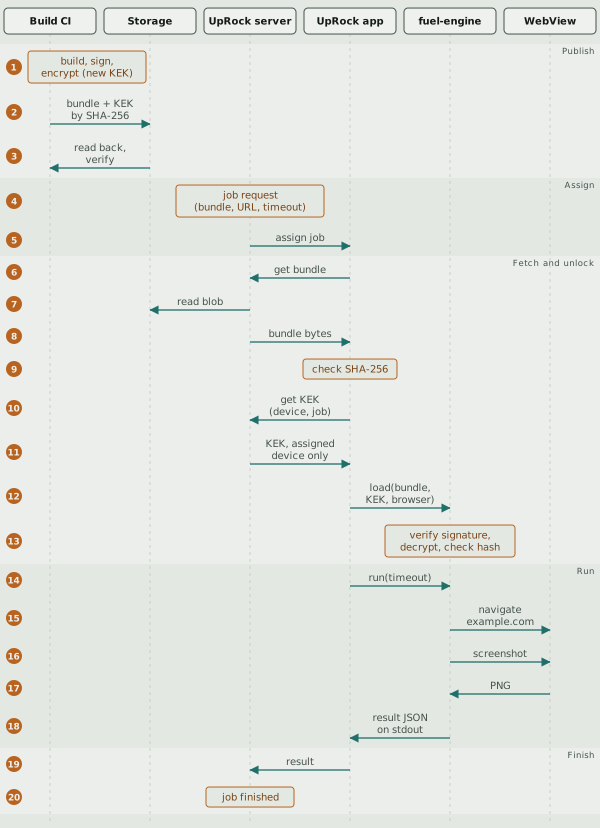
One job from build to result. The numbers match the steps below.
Publish (1–3)
A change to a bundle starts as a commit in UpRock's bundle repository, usually reviewed in a pull request. The build pipeline compiles the bundle, signs it with UpRock's Ed25519 key, and encrypts it with a fresh data key wrapped by a new key-encryption key (KEK) for that bundle (1). It uploads the sealed bundle and its KEK to storage, addressed by the bundle's SHA-256 (2), then reads them back and verifies the bundle the way a device would before the release counts as done (3).
Assign (4–5)
A customer asks the UpRock server for a job through its API: which bundle to run (by hash or by a named tag), the target URL, and a timeout of at most 15 minutes (4). The server picks a device that offers the needed capability and matches the job's placement constraints, and the app receives the job with the bundle's hash and timeout (5).
Fetch and unlock (6–13)
The app asks the server for the bundle, which the server reads from storage (6–8), and checks its SHA-256 against the hash in the job (9). It then asks for the KEK, naming itself and the job (10). The server releases the KEK only if that device is the one assigned to that job and the hash matches (11). The app hands the bundle, the KEK and its browser provider to fuel-engine (12). The engine verifies the signature before decrypting anything, then unwraps the data key, decrypts the payloads and checks the WASM hash against the manifest (13). A bundle that fails any of these checks never runs.
If the app ran the same bundle in the last 10 minutes, it reuses the bundle it already unlocked and skips steps 6–13. If it still holds the KEK but not the unlocked bundle, it downloads and verifies the bundle again but skips the key request (10–11).
Run (14–18)
The app runs the bundle with the job's timeout, which the engine turns into an instruction budget (14). When the bundle navigates or takes a screenshot, the call goes from the engine through the app's browser provider to the WebView, and the engine checks the bundle's browser capabilities before each call (15–17). The bundle prints its result, here including the screenshot, as JSON on stdout (18).
Nothing on the server or in the app inspects what a bundle does between steps 14 and 18. The job's URL doesn't limit where the bundle navigates: a signed bundle that loads https://example.com will load it. What limits a bundle is the capabilities in its signed manifest (section 05), with the gaps listed in section 09. A bundle with socket capabilities could also send data out over its own connections instead of through its result.
Finish (19–20)
The app sends the result to the server. Larger files go up in 1 MiB chunks, each with a CRC32C checksum (19). The server marks the job finished, and the customer fetches the result through the API (20). Timeouts apply at every layer: the API caps a job at 15 minutes, the server expires the assignment, the app enforces the job's timeout, and the engine enforces its instruction budget.
08 · Desktop, briefly
The desktop app follows the same approach: the same bundle format, signature scheme and capability model, and like Android it grants whatever a signed manifest requests. Outbound-only sockets sit behind the same kind of private-range filter, with every public destination allowed, and each task gets a fresh, isolated browser context. It runs on a separate engine written in Go, built on a private fork of the open-source wazero runtime, that shares no code with the Rust one.
It differs from Android in ways that cut both ways. Its /workspace is a directory on the host disk rather than in memory, and CPU is limited only by a wall-clock timeout. On the other hand, it enforces the memory (512 MB) and stdout/stderr (64 MB) limits that Android doesn't yet; stack size isn't enforced on either. As on Android, no bundle can start a process: desktop's spawn path has no commands registered, so every spawn fails. Browser traffic isn't filtered either.
09 · Known limitations
These are true of the code as published. As section 01 explains, all but the first need a bundle we signed.
- A build without a trusted key accepts unsigned bundles. That's the default for a plain build without
FUEL_PUBLIC_KEY, and nothing refuses to build without it yet. Production builds include the key. - Browser traffic isn't private-range filtered. The socket filter doesn't cover browser navigation, redirects or page requests, on either platform, so a bundle with browser capabilities can reach loopback and local-network addresses through the browser.
- No replay protection. An old bundle with a valid signature stays valid. The only way to retire one is to stop releasing its key, and that only reaches devices that don't already hold it: the app keeps keys it has received in memory until it's closed.
- Some limits aren't enforced. Memory, stack and output size are clamped but not enforced on Android, and
/workspaceand/site-packageshave no size cap. - Some address ranges are missing from the socket filter. Most notably NAT64 (
64:ff9b::/96), which IPv6-only mobile networks use to reach IPv4 hosts, plus 6to4, Teredo and a few reserved IPv4 blocks.
The full list, including keys not being zeroed, capabilities that are listed but not checked, and navigation scripts being gated by the navigate capability alone, is in the Known issues section of the repository's SECURITY.md, which stays current as fixes land.
10 · What's open and how to check it
The repository contains the bundle parser and verifier, the capability model, the socket filter, the WASI extensions, the browser host functions, and the Android JNI bridge with its Kotlin wrapper and browser provider skeleton. Closed: the Android app (including its browser provider), the desktop engine and app, and the build and signing tooling.
To check a claim in this post, start here:
| Claim | Where to look |
|---|---|
| Bundle format, signing, encryption | fuel-engine/src/bundle.rs |
| Capabilities and limits | fuel-engine/src/capabilities.rsfuel-engine/src/engine.rs |
| Socket filter | fuel-engine/src/wasi_ext/ssrf.rsfuel-engine/src/wasi_ext/socket.rs |
| Browser capability checks | fuel-engine/src/browser.rs |
| Filesystem and archive unpacking | fuel-engine/src/fs/fuel-engine/src/tar_extract.rs |
| What Android grants, JNI entry points | fuel-jni/src/lib.rsfuel-jni/src/browser_bridge.rs |
cargo test runs the unit tests on any Linux machine.
The repository also contains fuel-network, an optional HTTP client crate for downloading media after extraction. It isn't used in production and isn't linked into the Android library, so it doesn't change what section 05 says: bundles get no host HTTP client, only sockets.
Our Android library is built from the published code plus our public signing key, but the build isn't reproducible byte for byte yet, and the shipped app doesn't yet report which engine commit it contains. The repository is public so anyone can read the code, build it, run its tests, use it in their own projects, send improvements, and check any claim in this post against the code.
If you find a security problem, please report it through the contact in the repository's SECURITY.md.
"Fuel" is an internal codename. Any overlap with Fuel Labs' Fuel project or the fuel-* crates is a coincidence; we have no affiliation with them.